case study
Improving control over
user notifications

Intro
Notification settings were too rigid and didn’t let users manage frequency or relevance to their roles. Asset Managers, in particular, needed more tailored email notifications.
Tasks
Improve the notifications settings page to give users more control over which emails they receive and how often.
Provide Asset Managers with notifications when key stats are updated on assets (properties) they manage.
Design and build the email template for these notifications.
Results
These updates have only recently launched, but feedback has been positive. Subscription to lease notification emails has increased, and users report that notifications are easier to manage.
Role
Design lead, collaborating with Product Management and Engineering teams.
01
The initial brief and why it changed
The original brief was to add a new ‘data change’ notification for Asset Managers, so they’d know when key stats were updated on their assets. But the current notification settings were too limited to support this.
Two key reasons for this were:
Asset Managers already received lease event notifications (e.g. for upcoming renewals), and had selected specific assets for these. Since they’d likely want the same assets for key stat change alerts, simply adding a new notification would force them to duplicate this selection, creating confusion and unnecessary duplication.
Users couldn’t customise notification frequency, which had already led many to turn off email notifications entirely. Without fixing this, uptake would be low.
02
Rearranging the settings page (MVP)
To improve usability, I introduced a global toggle to turn all notifications on or off and grouped them into three clear sections:
General (across the whole platform)
Market (assets available to buy)
Managed (assets already purchased and being managed)
This created a better structure for future notifications. The MVP still only supported email-based alerts and didn’t yet introduce frequency options.

Old notifications settings page

MVP grouped notifications
03
Understanding data change notification requirements
With the MVP shipped, we focused on refining the new data change notifications.
User interviews and insights showed a wide range of preferences. We needed to build flexibility into both what users were notified about and how.
Users wanted control over:
Which assets they received updates for
Which units (e.g. floors in a property) triggered alerts
Since these overlapped with lease notifications, I streamlined the asset selection process to cover both types of notifications.
Some assets had 40+ key stats, so listing all of them in an email would be overwhelming. To address this, we:
Limited each asset or unit to 12 key stat changes
Let users prioritise which stats appear first in the email
04
Redesigning Managed notifications
I reviewed how the current lease notifications worked alongside the new data change alerts. This helped identify overlapping functionality needed and reduce duplicated actions.

Notification requirements

Overlap of requirements

Combined requirements for Managed notifications
05
Changing hierarchy of asset selection
In the MVP users could only select assets for lease event notifications, which limited flexibility.

Old asset selection
The updated design lets users apply Managed notifications (lease events or data changes) to:
Assets where they’re a contact (which auto-updated each time they were added to a new asset)
Manually selected assets (chosen from a searchable list)
This added flexibility and reduced setup duplication.

New asset selection
06
Designing for flexible key stat selection
I also introduced a flow to let users choose and prioritise the key stats that trigger data change emails, using an existing pattern already in the platform which users were familiar with.
Key stats selection
07
Creating the data change email notifications
To make updates easily digestible I:
split Asset and Unit changes into their own 'blocks'
showed old stats with a strikethrough, and new stats were shown underneath
showed positive changes in green, negative in red, and neutral in grey
This was also the first time I coded a client-facing design! I used SendGrid to create HTML templates, which the Engineering team then connected to the API.
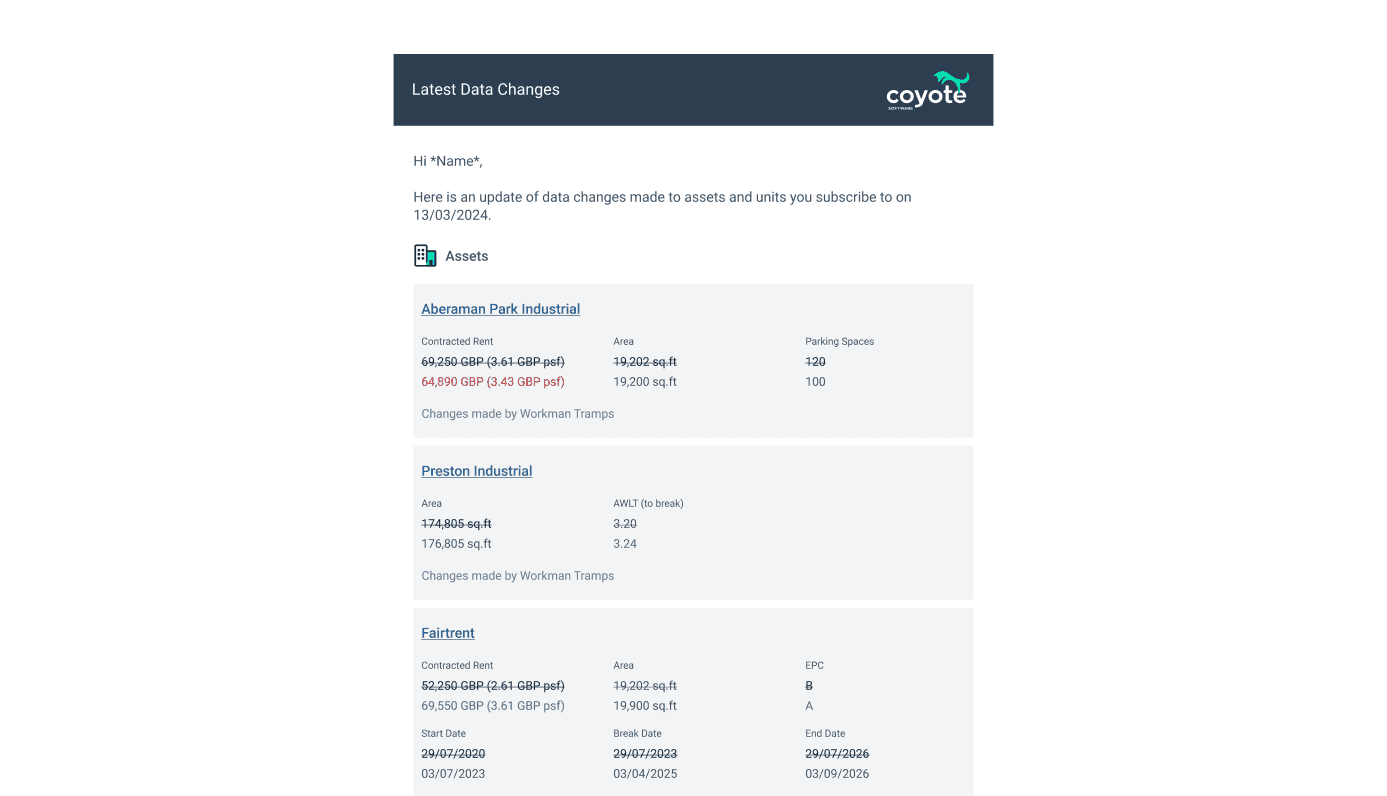
Example data change email notification